
Last updated on
Oct 31, 2026

FL Notice OwnerNotice Contractor free printable template
pdfFiller is not affiliated with any government organization

Fill out
Complete the form online in a simple drag-and-drop editor.

eSign
Add your legally binding signature or send the form for signing.

Share
Share the form via a link, letting anyone fill it out from any device.

Export
Download, print, email, or move the form to your cloud storage.
Why pdfFiller is the best tool for your documents and forms


End-to-end document management
From editing and signing to collaboration and tracking, pdfFiller has everything you need to get your documents done quickly and efficiently.
Accessible from anywhere
pdfFiller is fully cloud-based. This means you can edit, sign, and share documents from anywhere using your computer, smartphone, or tablet.
Secure and compliant
pdfFiller lets you securely manage documents following global laws like ESIGN, CCPA, and GDPR. It's also HIPAA and SOC 2 compliant.
What is FL Notice OwnerNotice Contractor
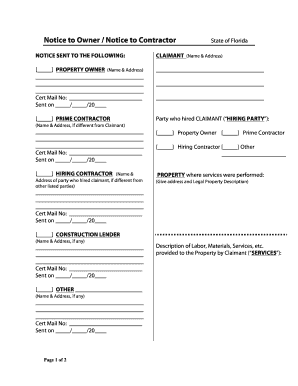
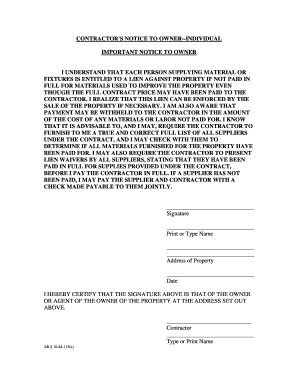
The Florida Notice to Owner / Notice to Contractor is a legal document used by claimants to notify property owners and contractors about potential construction liens.
pdfFiller scores top ratings on review platforms




I am very pleased with the outcome of the pdf documents and the ease of navigation in this software.
So far, so good. I'm just testing the service for the first time and it seems very easy. Thanks!
Who needs FL Notice OwnerNotice Contractor?
Explore how professionals across industries use pdfFiller.

FL Notice OwnerNotice Contractor is needed by:
-
Property owners in Florida
-
Contractors providing services
-
Subcontractors and suppliers
-
Real estate professionals
-
Legal advisors specializing in construction law
-
Anyone involved in construction projects
Comprehensive Guide to FL Notice OwnerNotice Contractor
What is the Florida Notice to Owner / Notice to Contractor?
The Florida Notice to Owner / Notice to Contractor serves as a crucial legal document in Florida's construction lien process. This form is designed to notify property owners and contractors about potential liens related to services provided by claimants. Its significance lies in ensuring that all parties are informed about the threat of liens, promoting transparency within the construction industry. The document includes essential components such as claimant and property owner information, ensuring that necessary parties are aware of the legal implications.
Purpose and Benefits of the Florida Notice to Owner / Notice to Contractor
This form plays a vital role in protecting the rights of claimants, including contractors, subcontractors, and suppliers. By utilizing the Florida Notice to Owner, claimants can secure their right to payment for services rendered, thereby mitigating risks associated with unpaid invoices. Additionally, it aids compliance with Florida lien laws, helping to prevent disputes between parties. Understanding its purpose is key for both claimants and property owners to foster a cooperative contractual environment.
Who Needs the Florida Notice to Owner / Notice to Contractor?
The Florida Notice to Owner / Notice to Contractor is intended for various types of claimants within the construction sector. This includes:
-
Contractors who perform work on properties
-
Subcontractors engaged in specialized tasks
-
Suppliers providing materials for construction projects
The notice is particularly necessary when completing work on a property before filing a construction lien to ensure that all involved parties are duly informed.
How to Fill Out the Florida Notice to Owner / Notice to Contractor Online
Filling out the Florida Notice to Owner online is an efficient process. Follow these step-by-step instructions:
-
Access the fillable form through an approved platform.
-
Enter the claimant's name and address, ensuring accuracy.
-
Provide the property owner's information clearly.
-
Describe the services provided in detail.
-
Review the form for completeness before submission.
By adhering to these steps, users can ensure that their notice is correctly filled out, paving the way for effective communication and legal compliance.
Review Process for Your Florida Notice to Owner / Notice to Contractor
Once you've filled out the document, reviewing it is crucial to avoid pitfalls. Check each field for accuracy and completeness, utilizing the following checklist:
-
Verify all names and addresses are correct
-
Ensure that a description of services is included
-
Confirm the form is signed by the claimant
Being diligent during this review process can prevent common errors that may jeopardize the notice's effectiveness.
Submission Methods for the Florida Notice to Owner / Notice to Contractor
The submission of the Florida Notice to Owner can be completed using various accepted methods:
-
Certified mail, ensuring a record of delivery
-
Electronic submissions through designated online platforms
It’s essential to send the notice to the correct recipient, which may include property owners or contractors. Confirming receipt is also advisable to track the notice’s status.
What Happens After You Submit the Florida Notice to Owner / Notice to Contractor?
After submission, it’s important to be aware of the next steps in the process. Generally, you should:
-
Monitor the status of your notice to ensure it reaches the intended recipient
-
Prepare for possible responses or follow-ups regarding pending payments
Understanding these subsequent steps can assist in effectively managing construction lien matters.
Digital Signature vs. Wet Signature for the Florida Notice to Owner / Notice to Contractor
Understanding signature requirements is pivotal when submitting the Florida Notice to Owner. The difference between digital and wet signatures can impact the validity of the document:
-
A digital signature is an electronic method accepted for verification
-
A wet signature requires a physical pen and paper
Both signature types must be applied correctly to ensure the document's acceptance in legal contexts.
Security and Compliance for the Florida Notice to Owner / Notice to Contractor
Ensuring document security is crucial for users handling sensitive information. Utilizing platforms like pdfFiller guarantees safety through:
-
256-bit encryption for data protection
-
Compliance with HIPAA and GDPR regulations
These measures are vital in safeguarding your documents while navigating legal processes related to construction liens.
Start Filling Out Your Florida Notice to Owner / Notice to Contractor Today!
Utilizing pdfFiller simplifies the process of completing the Florida Notice to Owner. The platform offers user-friendly tools designed for hassle-free document creation, signing, and submission. Emphasizing the security and efficiency of pdfFiller can significantly ease your document management needs.
How to fill out the FL Notice OwnerNotice Contractor
-
1.Access pdfFiller and search for the 'Florida Notice to Owner / Notice to Contractor' form using the search bar.
-
2.Open the form, ensuring that you have a stable internet connection for efficient use.
-
3.Before completing the form, gather necessary information such as your details as the claimant, the property owner's information, and a description of the services provided.
-
4.Begin filling in the form by clicking on the first blank field. Enter your name and address as the claimant where indicated.
-
5.Move to the next fields to input the property owner's details, including their name and address exactly as they appear on official documents.
-
6.Next, provide a detailed description of the services being offered or provided, ensuring clarity and specificity to avoid confusion.
-
7.As you complete each section, utilize pdfFiller's tools to adjust the layout or text as needed for readability.
-
8.Review your completed form thoroughly, checking all entered information for accuracy and completeness before finalizing.
-
9.Once satisfied, proceed to save your form. Click 'Save' to store a copy digitally on your account.
-
10.You can also download a copy directly to your device using the download button or submit the form via certified mail as instructed.

Who is eligible to use the Florida Notice to Owner / Notice to Contractor?
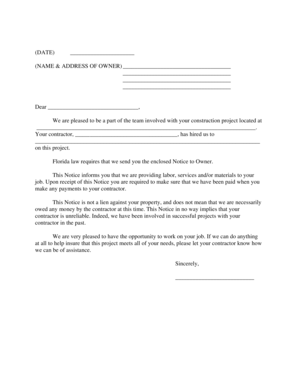
Anyone providing services or materials for a construction project in Florida can use this form. Claimants must notify property owners to protect their lien rights effectively.
What is the deadline for submitting this notice?
It is advisable to send the notice as soon as possible after the claimant begins work or delivers materials, typically within 45 days of the first service or delivery to maintain lien rights.
How should I submit the completed Florida Notice to Owner form?
The completed form should be sent via certified mail to ensure delivery confirmation. This provides legal evidence that the notice was sent appropriately.
Are there any supporting documents required?
Typically, no additional documents are required to submit with the Florida Notice to Owner. However, keeping records of the work performed can be beneficial.
What common mistakes should I avoid when filling out this form?
Ensure all names and addresses are accurate and match official records. Double-check descriptions of services to avoid ambiguity, as incorrect details can complicate lien claims.
How long does it take to process the notice?
There is no formal processing time since it is a notification; however, it is recommended to track delivery via certified mail for records. Lien rights begin once the notice is sent.
What if I need to correct a mistake after submitting?
If a mistake is identified post-submission, it’s best to consult with a legal professional to determine the best course of action, which may include sending a corrected notice.
Related Content
Related Forms




Related Catalogs
Get the latest insights from our blog


If you believe that this page should be taken down, please follow our DMCA take down process
here
.
This form may include fields for payment information. Data entered in these fields is not covered by PCI DSS compliance.